The crew is in the field.
The office runs itself.
FieldSupe handles the scheduling, dispatching, and invoicing while you actually run the business — or finally take a Saturday off.

The work is hard enough.
Your software shouldn't be.
Most field service tools are built for billion-dollar fleets. FieldSupe is built for the owner-operator who answers the phone, drives the truck, and signs the checks.
Scheduling lives in your head
Group texts, sticky notes, and the whiteboard above your desk. One missed call and the whole day shifts.
Invoicing happens Sunday night
You finished the job Friday, but the invoice waits until you're back at the kitchen table. Cash flow takes the hit every time.
Routes are gut-feel guesses
You know the neighborhood, but your crew is still backtracking. Fuel and hours quietly add up across the week.
Your tools don't talk
Quickbooks, Google Calendar, a spreadsheet, and that one app you bought in 2022. Nothing has the full picture.
One platform.
Every part of the day.
From the morning board to the route across town to the invoice that pays you — here's the real product, screen by screen.
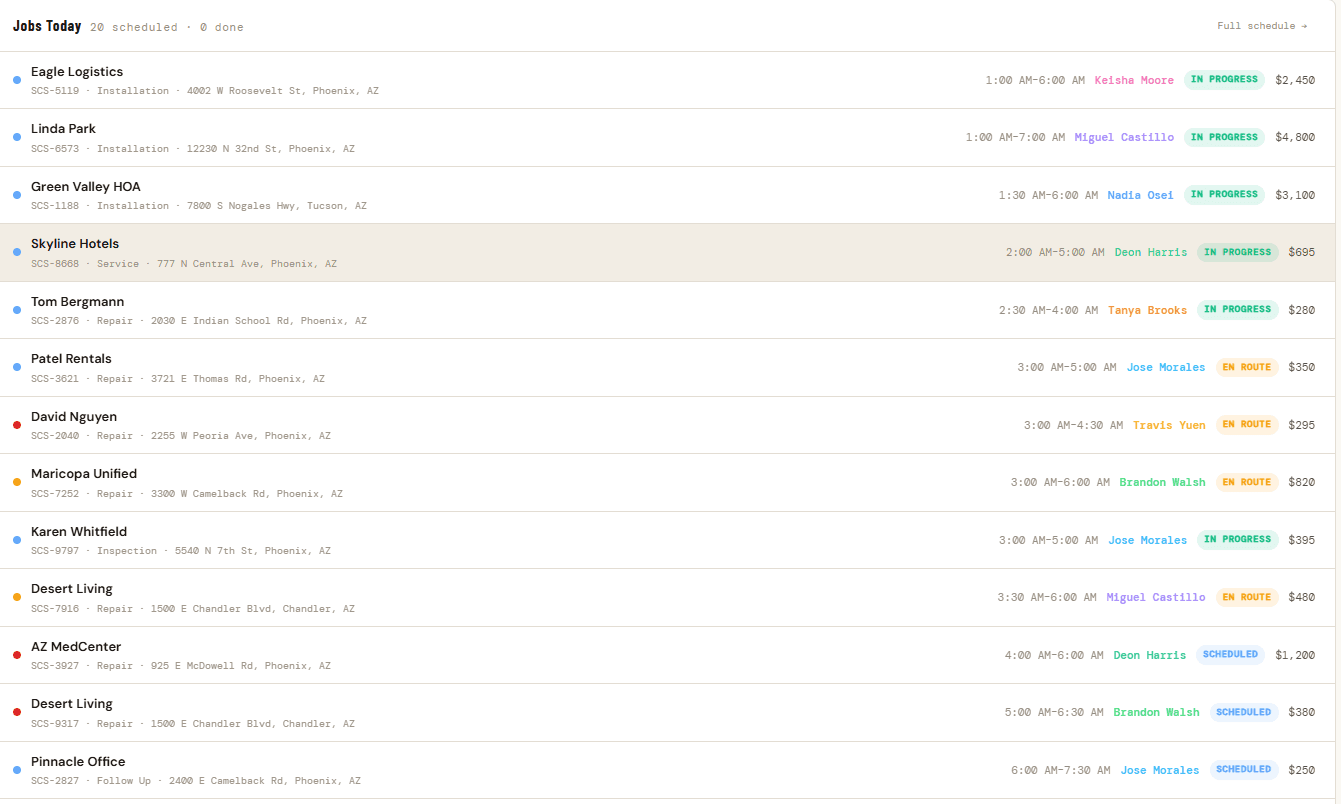
Every job today, at a glance.
Who's working what, where, and what it's worth — the whole day's schedule with live status on every job, from scheduled to en route to in progress. No morning huddle required.
- Every job with crew, time window, and value
- Live status — scheduled, en route, in progress, done
- Jump to the full schedule in a single click
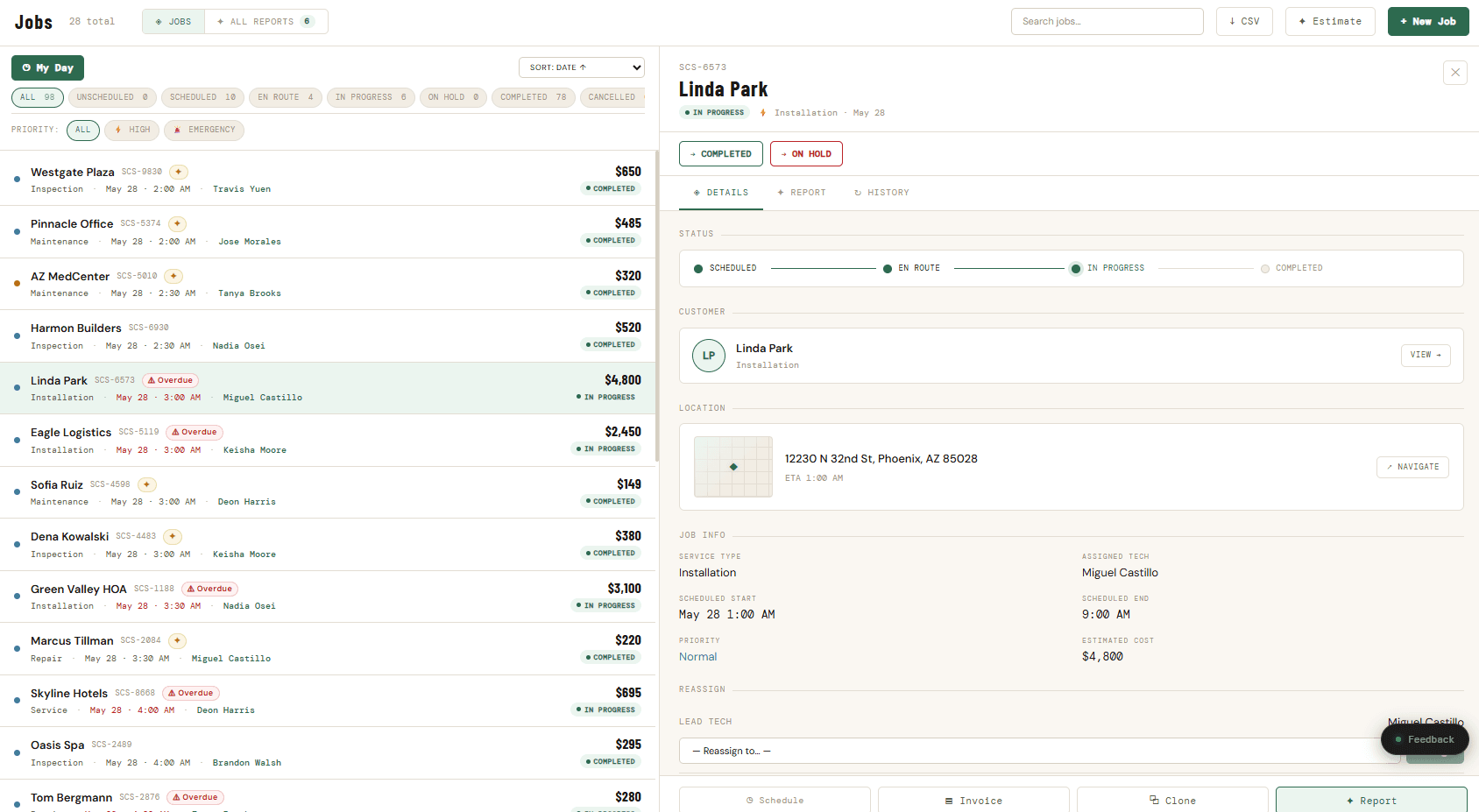
Tap any job for the full picture.
A visual status timeline, the customer, address with ETA, assigned tech, and estimated cost — plus one-tap actions to schedule, invoice, clone, or generate a report. Everything about a job in a single panel.
- Status timeline from scheduled to complete
- Customer, location, ETA, and assigned tech together
- Invoice, clone, or report a job in one tap
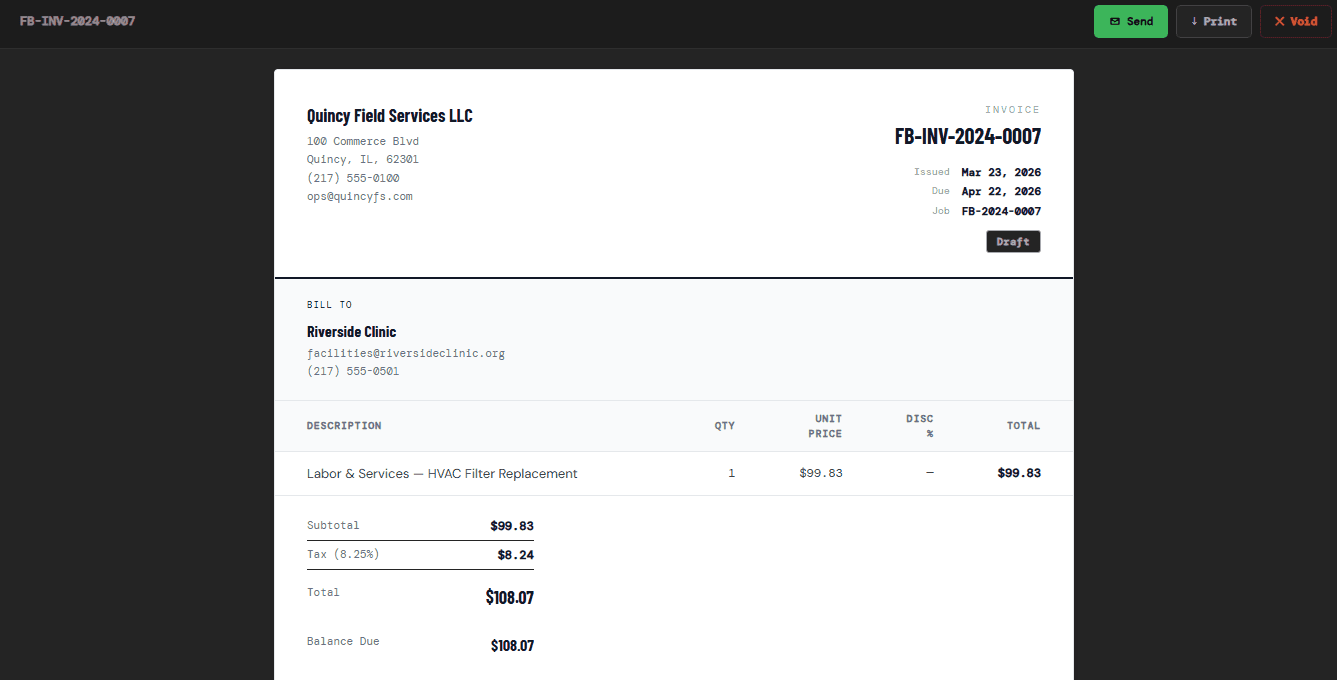
Send a clean invoice the moment the job's done.
Itemized lines, tax, and balance due — generated straight from the job. One tap to send, one button to mark paid, no more Sunday-night paperwork at the kitchen table.
- Professional, branded invoices from any job
- Send, print, or void in a single click
- Automatic tax and balance-due calculation
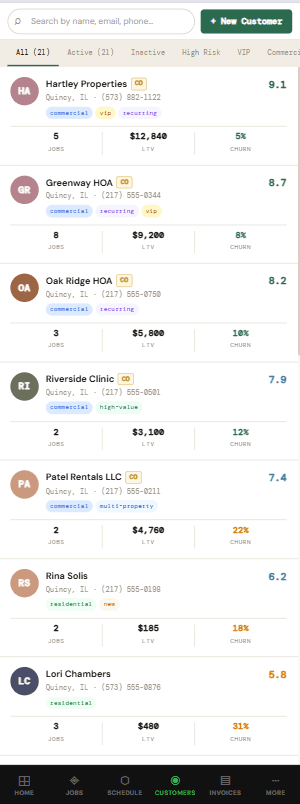
Know which customers are about to walk.
Every account with lifetime value, job count, and a churn score — sorted so the $12k commercial client at risk is impossible to miss. Search, filter, and act before they go quiet.
- LTV and churn risk on every customer
- Filter by active, high-risk, VIP, or commercial
- Tags for recurring, multi-property, and new accounts
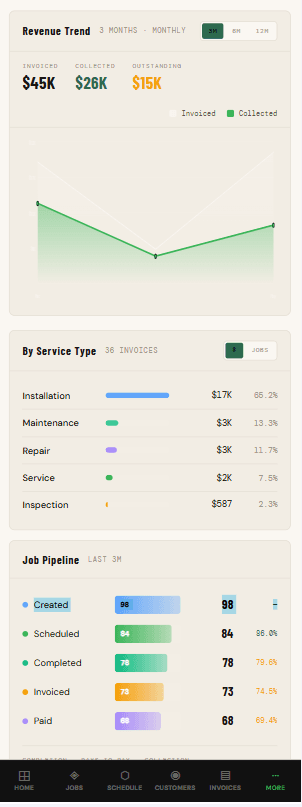
A second set of eyes on every number.
Revenue trend, service mix, and a full job pipeline — invoiced vs. collected, created through paid — tracked continuously, with AI on hand to turn the charts into a plain-English read on the business.
- Invoiced vs. collected revenue over time
- Job pipeline from created to scheduled to paid
- Ask AI for an instant, written analysis
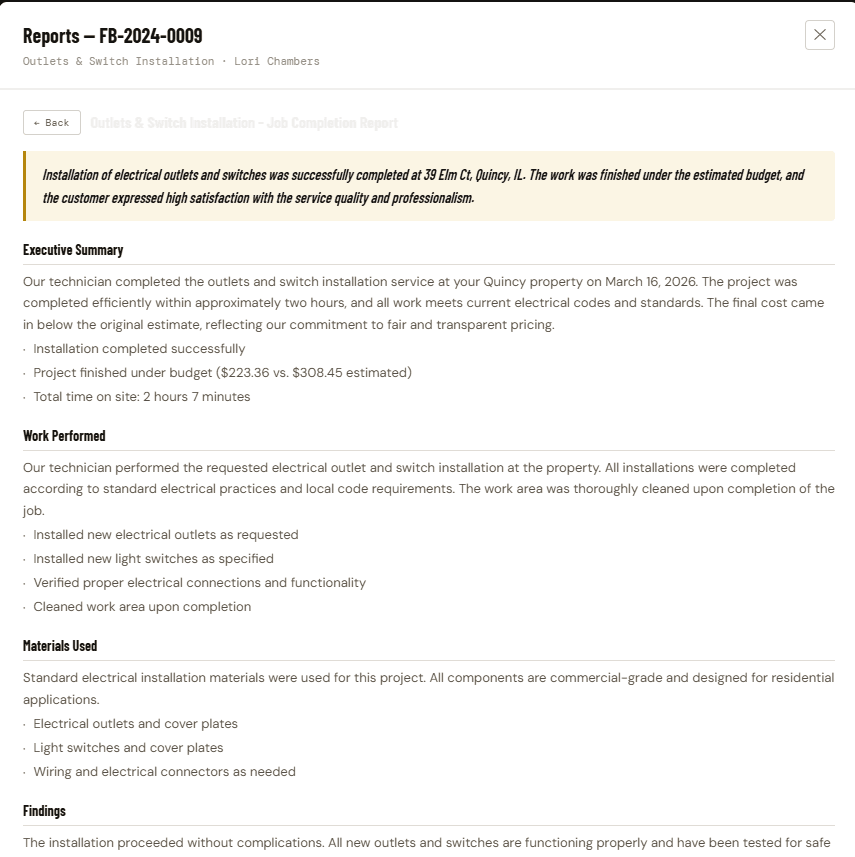
Polished job reports, written for you.
Finish a job and FieldSupe drafts a complete completion report — executive summary, work performed, materials used, and findings — ready to hand to the customer and worth charging for.
- Executive summary and itemized work performed
- Materials used and findings, auto-drafted
- Customer-ready formatting, every time
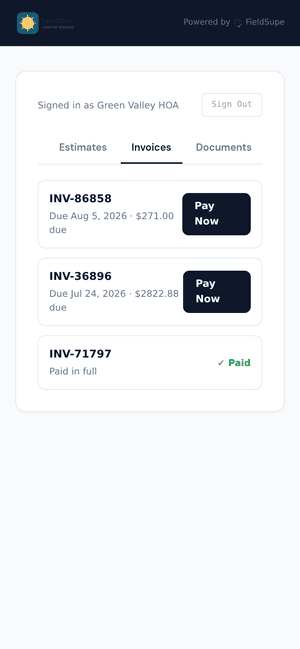
Your customers, self-served — with your logo front and center.
A branded portal that leads with your logo and business name — customers check appointments, approve estimates, and pay an invoice online in one tap. Fewer 'what time is my tech coming' calls, faster payments.
- Your logo and business name front and center on every invoice
- Appointments, estimates, invoices, and job history in one place
- Pay online in one tap, straight from the invoice
We didn’t just show you
the highlight reel.
Job tracking, customer records, scheduling — the fundamentals are all here too. Browse by category to see everything FieldSupe covers.
Job Board
Every job today, at a glance — status from scheduled to done.
- Every job with crew, time window, and value
- Live status — scheduled, en route, in progress, done
- Jump to the full schedule in a single click
Calendar & Routes
Day and week views with multi-stop routes for every crew.
- Day and week views for the whole crew
- Multi-stop routes assigned per tech
- Drag-and-drop rescheduling without leaving the calendar
Live Crew Map
See exactly where every truck and tech is, right now.
- Every truck and tech tracked in real time
- Spot who’s actually closest before you dispatch
- No more “where are you” texts
Route Optimization
AI sequences stops for the fastest possible day.
- AI sequences every stop for the fastest realistic day
- Cuts backtracking and windshield time across the whole crew
- Included on the Pro plan
Built for the way
small crews actually work.
Enterprise software has features you'll never use and a price to match. Spreadsheets are free but cost you weekends. FieldSupe is what's in between.
| Feature | Spreadsheets & texts | Enterprise FSM | FieldSupe |
|---|---|---|---|
| Setup time | Already there | 4–8 weeks | ✓ Under an hour |
| Built for 1–15 person crews | — By accident | — No — built for 100+ | ✓ Yes — that's the whole point |
| One-click invoicing from a job | — Manual | — 3 menus deep | ✓ Yes |
| Live crew map & routes | — No | Yes | ✓ Yes — with AI routing |
| Mobile app your crew will actually open | — Group texts | — Clunky | ✓ Yes — under 30s/day |
| AI insights & churn detection | — No | — Add-on $$ | ✓ Included |
| Pricing | Free + your weekends | $$$+ per seat | Flat — pay for crews, not seats |
See FieldSupe
on your business.
A 15-minute walkthrough — we'll seed your trade, your jobs, and your routes so you can see exactly what your week looks like in FieldSupe.
- ✓Live, hands-on walkthrough tailored to your trade
- ✓We answer the “but does it do…” questions on the call
- ✓No sales pitch — if it's not a fit, we'll say so